
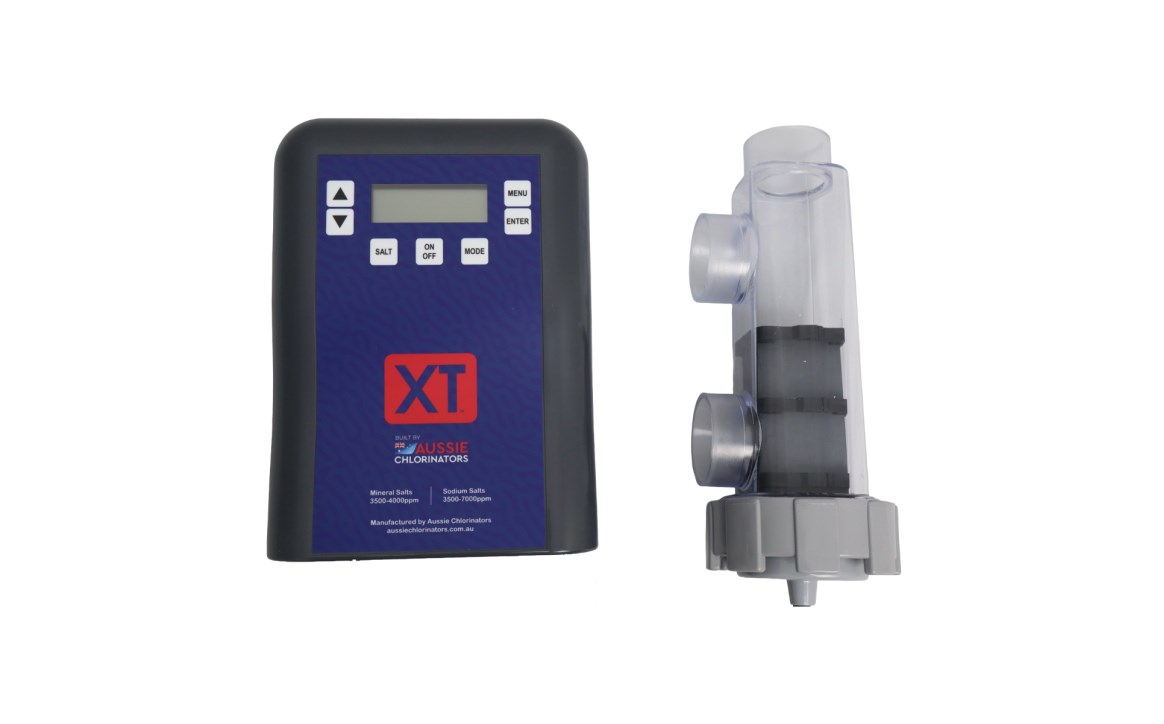
Aussie XT Chlorinator FAQs
Is the Aussie XT the same as a SuperPool Premium chlorinator?
Yes, the Aussie XT or Aussie Xtreme is almost identical to the Superpool Premium chlorinator. It is produced by the same manufacturer in Queensland but has different branding and colours. This also applies to the Lincoln, H2Flo, Stanley, and Legend Premium chlorinators. The K-Chlor Premium Digital Chlorinator is very similar to this and utilises the same controller/power-pack but has a different cell and housing manufactered by Kawana Chlorinators.

My chlorinator is displaying 'Cell EOL', what does this mean and how do I fix it?
Cell EOL is the abbreviation of 'Cell End Of Life'. Don't stress too much about this as it doesn't really mean anything serious. This just indicates that the cell has reached a certain number of operating hours and the warranty on the cell has expired.
For older units this means it has reached 10,000 hours, but for newer units this has been increased to 12,000 hours.
It is important to note that this DOES NOT MEAN YOU NEED TO REPLACE THE CELL. It only means that you will need to keep a closer eye on the cell and chlorine production. To determine whether the cell needs to be replaced follow the advice below.
How do I determine whether I need a new cell?
To determine whether your cell needs to be replaced you need to test whether it can produce enough chlorine.
Before testing you should ensure that the cell is clean and that there is no bridging between the cell plates as this will affect your test results. Bridging is when there is calcium (or any other buildup) that cause a bridge or connection between the plates on the cell. As the cell ages this will build up will accumulate faster.
If the cell is clean, you will also need to check your salt levels. The in-built salt test will usually suffice for an initial test but it is not highly accurate, especially as the cell ages and if you get a failure or a low salt reading you should get a test using a professional salt meter before adding salt.
Once you are sure the salt level is within range and the cell is clean you can test the cell by setting the chlorine production to 100% and observing the actual chlorine production. The actual production should reach 100% with a margin of about 5% (95% - 105%). If the chlorine production does not reach 100% then your cell is wearing out. This does not necessarily mean that the cell needs to be replaced but it means it will need replacing soon.
Step 1. Clean the cell.
Step 2. Ensure the salt level is within range.
Step 3. Set output to 100% and see if it is capable of reaching this.
At Pool Geeks, we generally replace a cell when it is only capable of producing a maximum of 80% or less, though this cut-off may be higher depending on the size of the chlorinator compared to the pool and operating hours.
If the chlorinator has been sized with a bit of leeway you can run the chlorinator at less than the maximum production and still achieve the necessary chlorine levels in your pool.
If it is not sized with any leeway and you need more chlorine you can increase operating hours to achieve the necessary chlorine levels. This will increase your power consumption but if you have a variable speed pump and aren't reliant on high flow rates you can simultaneously reduce the pump speed to negate any additional power consumption.
Deterioration of the cell increases exponentially, so it will deteriorate faster as the maximum production drops. We strongly recommend replacement of the cell at 80% maximum production because the deterioration occurs too fast after this point, making chlorine dosing unpredictable.
My chlorinator is displaying 'TErr', what do I do?
'TErr' is an abbreviation of Temperature Error and indicates that the thermostat in the cell is not working. It could mean that the cell is dirty, the connection is poor, or could indicate that the cell is worn out. It could also indicate that the 5 volt regulator on the main PCB has failed.
Fix 1 - Disconnect and reconnect the multi way plug (the 6 coloured block plug) under the power-pack.
Fix 2 - Clean the chlorinator cell (See cell cleaning)
Fix 3 - Replace chlorinator cell. If this is within warranty it will need to be returned to the manufacturer. If it is outside warranty, we recommend getting a technician to test this with another cell that is known to be working rather than purchasing a new cell straight away. If this doesn't fix the issue the unit will need to be returned to the manufacturer for repair or will need a new main PCB.
My chlorinator is displaying 'Pump Fail', what do I do?
Pump Fail indicates that no water flow was detected through the chlorinator cell. Ensure that you have adequate flow through the chlorinator cell.
To clear the error message:
• Turn the unit off at the power outlet and leave it off for at least 20 seconds. When you turn the power back on the error should have cleared.
If there is adequate flow:
• Check that the cell is clean and in good condition.
A dirty cell can have trouble detecting water flow. Clean the cell and try again.
• If the cell is worn out you will need to replace the cell
If there is not enough flow:
• Isolate the issue
- Disconnect the suction cleaner (if used), remove the skimmer plate, and retest.
- Empty the pump and skimmer basket/s, and clean or backwash the filter/s and retest.
- Set the filter to bypass/recirculate (for sand/media filters), or remove the filter elements and retest.
If the pump doesn't turn on:
Isolate the issue
- Disconnect the pump from the base of the chlorinator and plug it directly into the power outlet to see if it turns on. If it starts when plugged into the power outlet but not when plugged into base of the chlorinator this indicates a failure of the chlorinator Main PCB and will require a technician to repair. In most cases this will need to be returned to the manufacturer.
